
Menu
eSIM Installation
Installing an eSIM in your device is a simple process, and with three easy methods available, you can choose the one that works best for you. At Roamic, we provide detailed installation instructions via email, ensuring a seamless installation experience. Here’s a step-by-step guide on how to install your eSIM:
Method 1: Installing the QR code
- Check compatibility: Make sure your device supports the eSIM function. Most modern smartphones, tablets, and smartwatches are compatible.
- Access your email: Open the email from Roamic containing your eSIM installation details.
- Locate the QR code: Look for the QR code in the email. This is essential for the setup process.
- Scan the QR code: Open your device’s camera and scan the QR code directly.
- Confirm installation: Follow the on-screen instructions to complete the installation. Your eSIM should be active and ready to use.
Method 2: Manual installation using activation code
- Retrieve your activation code: In the email from Roamic, find your activation code and the necessary setup details.
- Open Settings: Go to the “Cellular” or “Mobile Data” section in your device’s settings.
- Add plan manually: Choose the option to add a plan manually.
- Enter details: Enter the activation code and other required details as provided in the email.
- Activate eSIM: Follow the instructions to complete the installation. Your eSIM will be activated shortly.
Method 3: Automatic installation for iPhone
- Access your email: Open the email from Roamic containing your eSIM installation link.
- Click the link: Click the installation link provided.
- Follow the instructions: Your iPhone will automatically guide you through the setup process.
- Setup complete: Confirm installation and your eSIM is ready to use.
By following these simple steps, you’ll be able to easily install your eSIM and enjoy seamless connectivity. If you have any problems, Roamic’s customer service team is always available to help.
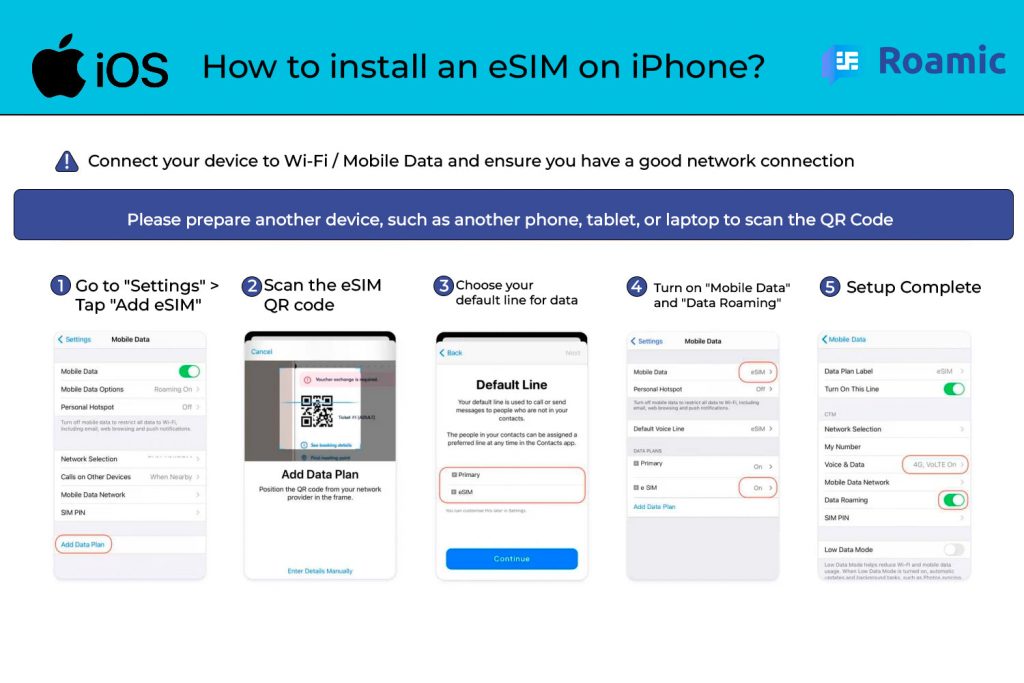
How to activate an eSIM: a step-by-step guide
Activating your eSIM is the final step to enjoying seamless connectivity with Roamic. Follow these steps to ensure a smooth activation process and remember to manage your data settings to avoid unwanted charges.
Step 1: Verify eSIM installation
- Check the installation: Make sure your eSIM is installed correctly in your device. If not, see our installation guide.
- Access Settings: Open the “Settings” app on your device and navigate to the “Cellular” or “Mobile Data” section.
- Select eSIM: Locate and select the eSIM you just installed. Make sure your device recognizes it.
Step 2: Choose the right eSIM
- Select your data plan: In the “Cellular” or “Mobile Data” settings, choose the eSIM data plan that suits your needs. Roamic offers several plans to suit your travel or everyday data needs.
- Set default line: Set your eSIM as the default line for mobile data to ensure you’re using the correct data plan.
- Enable eSIM: Turn on the switch to enable your eSIM for data usage.
Step 3: Manage data roaming settings
- Disable data roaming on your old SIM: To avoid unexpected data charges, go to your device’s settings and make sure data roaming is disabled for your primary SIM.
- Enable eSIM data roaming: If you’re traveling abroad, enable data roaming for your eSIM in the “Cellular” or “Mobile Data” settings. This ensures you stay connected without using your primary SIM’s data.
- Check data usage: Check your data usage settings to confirm that the eSIM is being used for data and not your primary SIM.
Step 4: Final Activation Steps
- Restart your device: Restart your device to ensure all settings are applied correctly.
- Connectivity test: Open a browser or any internet-connected app to test your eSIM’s connectivity. If everything is set up correctly, you should be online and ready to use.
- Contact Customer Service: If you encounter any issues, please contact Roamic Customer Service for assistance.By following these steps carefully and managing your data settings, you’ll be able to fully activate your eSIM and enjoy uninterrupted service. Be sure to monitor your data usage to stay within your plan limits and avoid additional charges.